RT Contact Form Telegram Guide
Welcome to the official documentation for the RT Contact Form Telegram component designed exclusively for RapidWeaver Elements.
Traditional contact forms rely on PHP `mail()` functions or complex SMTP setups, which often lead to messages being delayed, flagged as spam, or completely lost due to server restrictions. This component revolutionizes web communication by securely routing your users' messages directly to your Telegram app (either in a private chat or a group).
Furthermore, this component provides ultimate layout flexibility. Instead of forcing a rigid set of inputs, it features an internal Dropzone `dropzone-form-inputs`. This allows you to drag and drop any native RapidWeaver Elements text fields directly into the form, building anything from a simple lead capture to a complex survey.
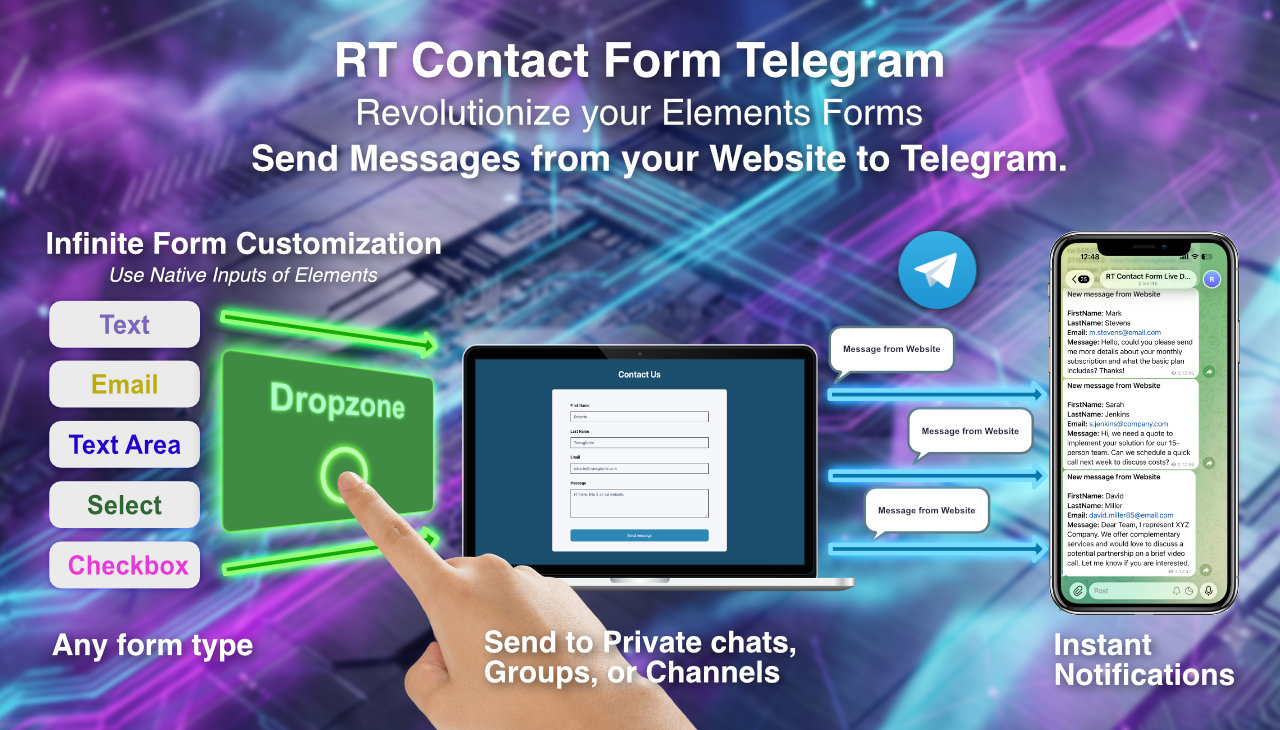
Connection Modes: Client-Side vs Server-Side
The framework offers two distinct routing architectures to match your server capabilities and security needs. You can switch between them using the "Connection mode" dropdown in the inspector.
Getting the Bot Token
To send messages to Telegram, you need a Bot to act as the messenger.
The token is the "access key" that allows your application to control the bot. To create it, Telegram uses an official bot called BotFather.
- Open Telegram, from a smartphone or computer.
- In the search bar, type @BotFather and select the result with the official blue checkmark.
-
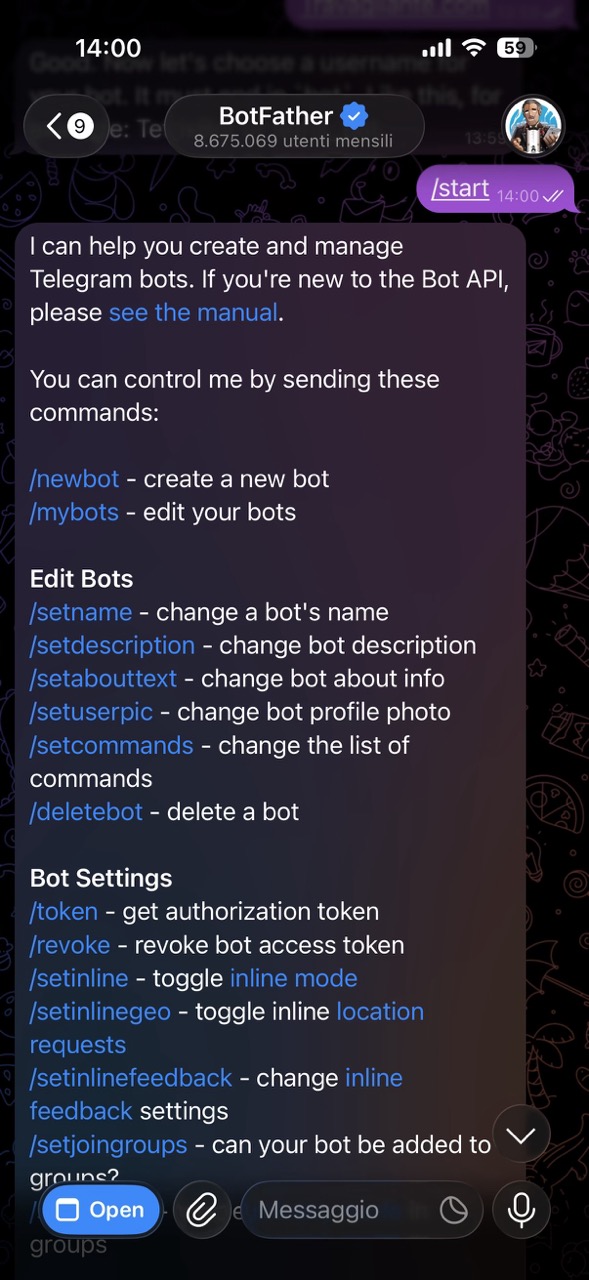
Start the conversation by clicking the Start button at the bottom (or type /start and send).
-
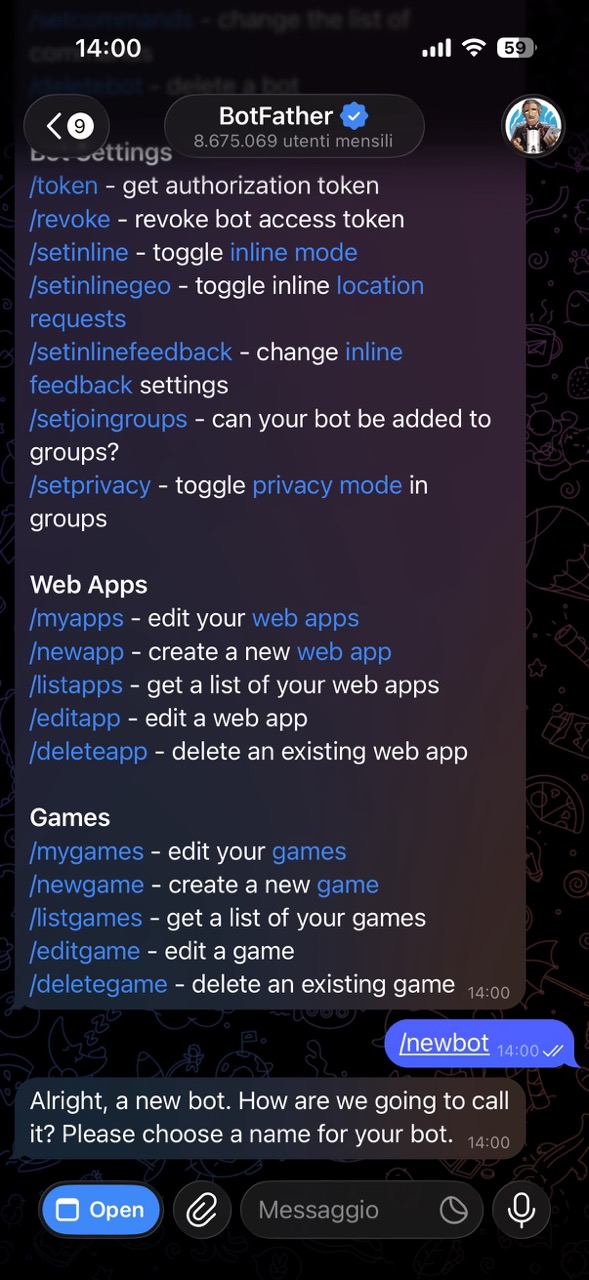
Send the command /newbot to begin the process of creating a new bot.
-
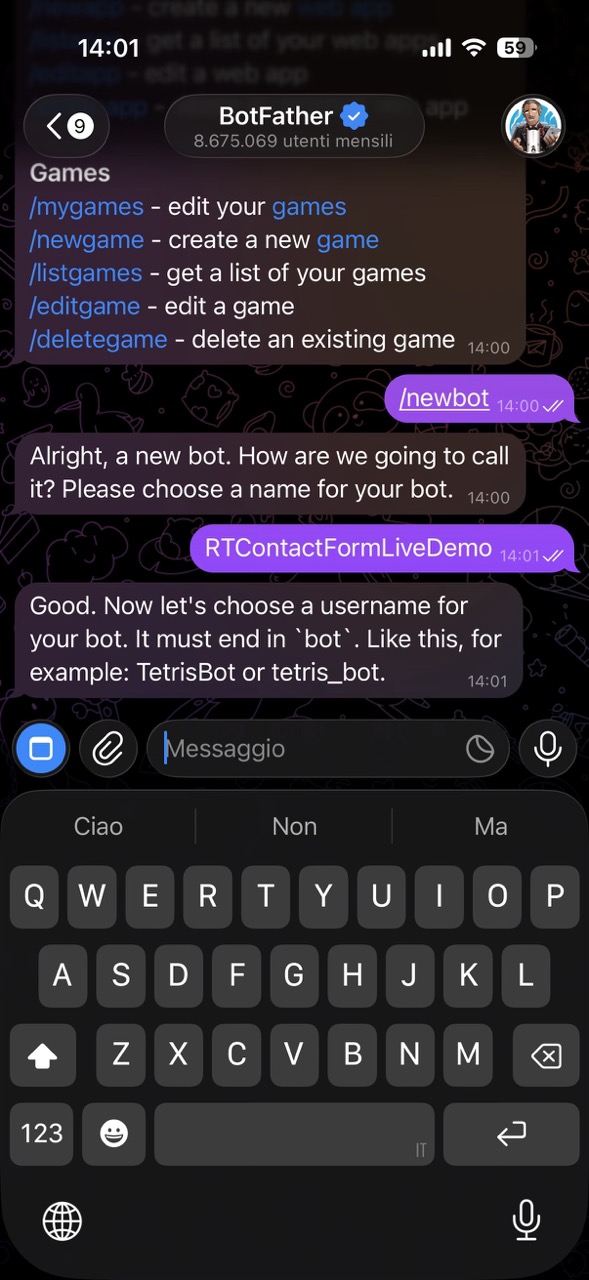
Choose a name: BotFather will ask you what you want to call the bot (e.g., "My Notification Bot"). This is the name displayed to users.
-
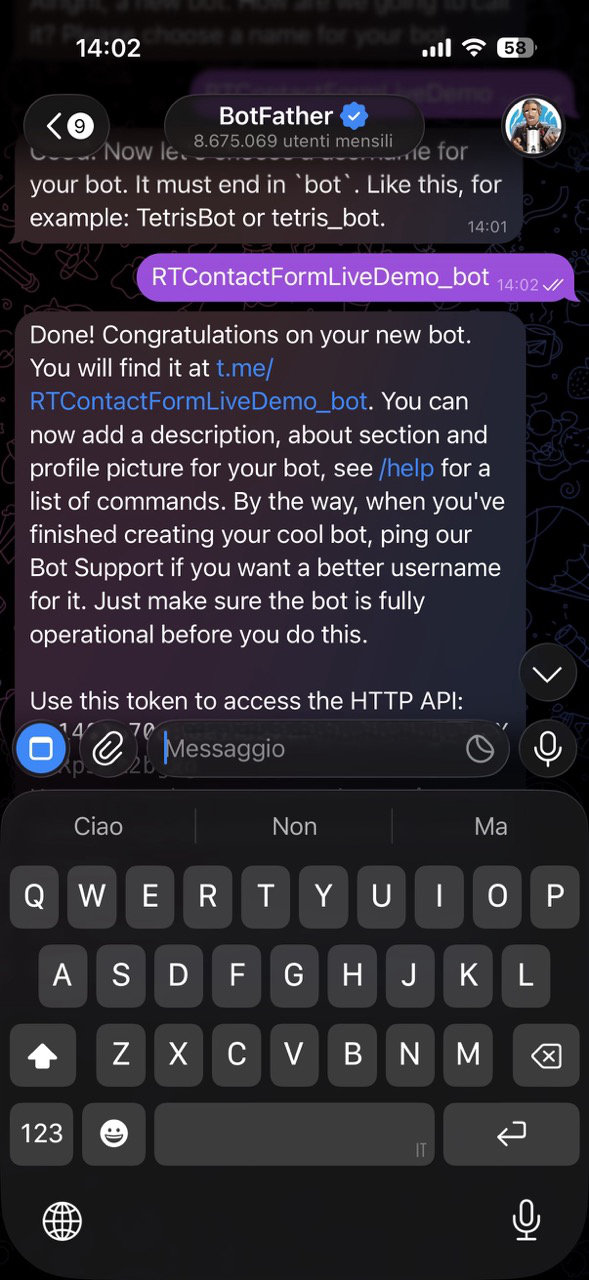
Choose a username: Now you'll need to choose a unique username. It must end with the word bot (e.g., MyNotifications_bot or MyNotificationsBot).
-
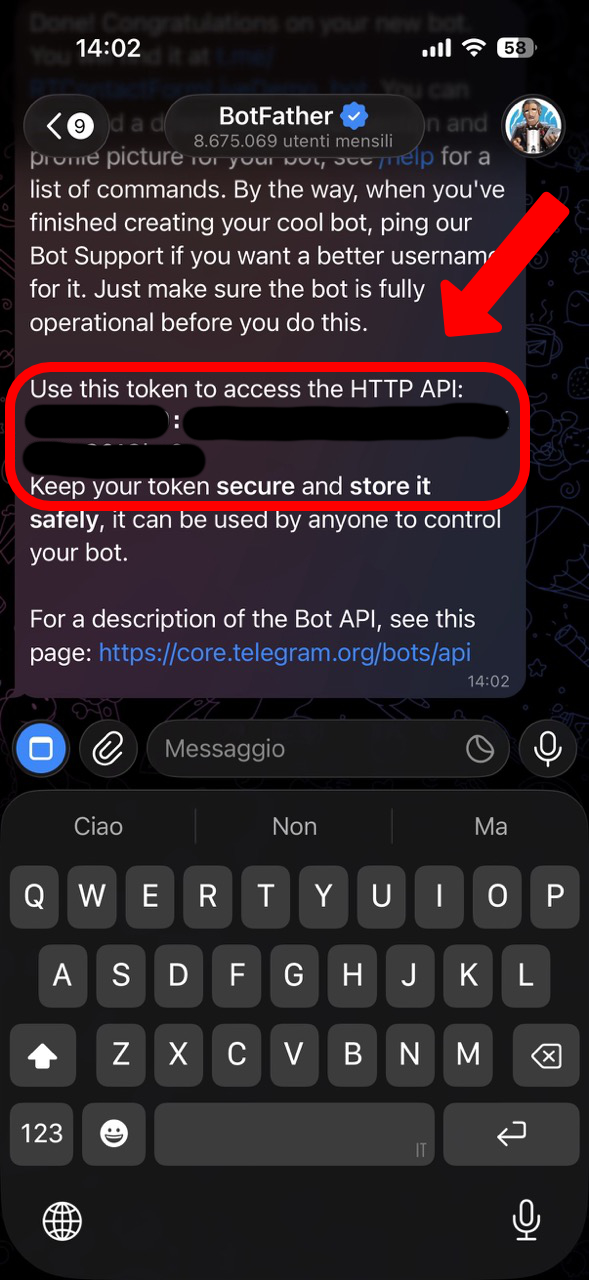
Save the Token: If the username is available, BotFather will send you a congratulatory message. Inside the message, you'll find your HTTP API Token (a long string similar to this: 1234567890:ABCdefGHIjklmNOPQrsTUVwxyz).
Retrieving your Chat ID
The Chat ID determines where the bot delivers the messages. It can be your private DM or a group chat.
-
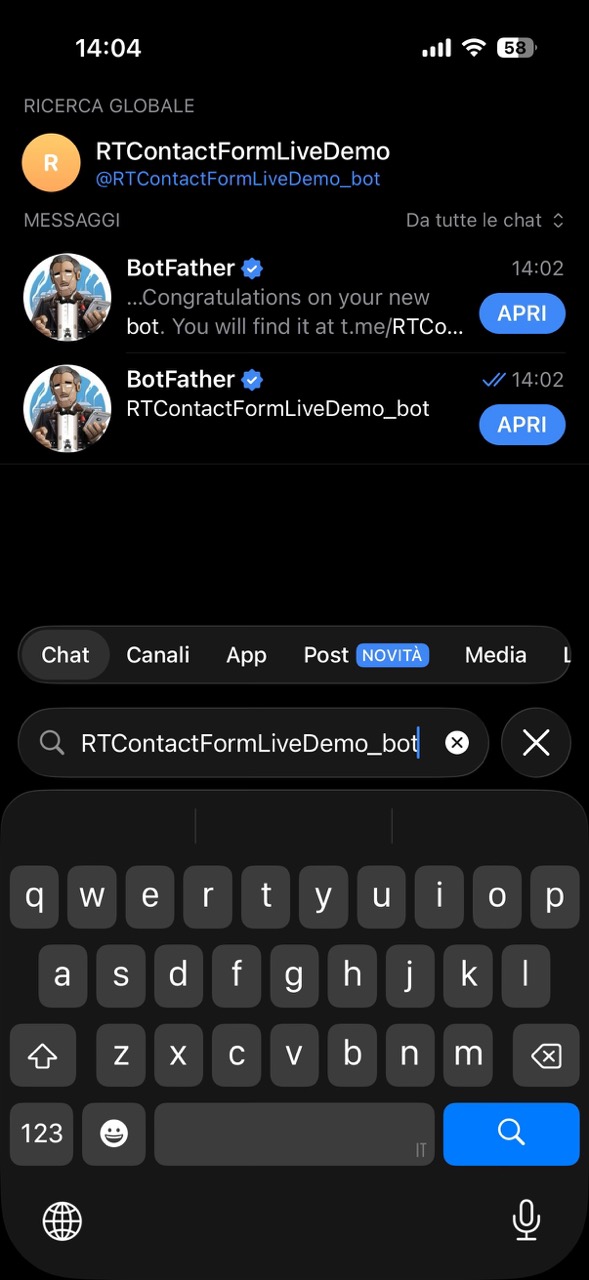
Start your new bot: Search Telegram for the username of the bot you just created (e.g., @MyNotifications_bot).
-
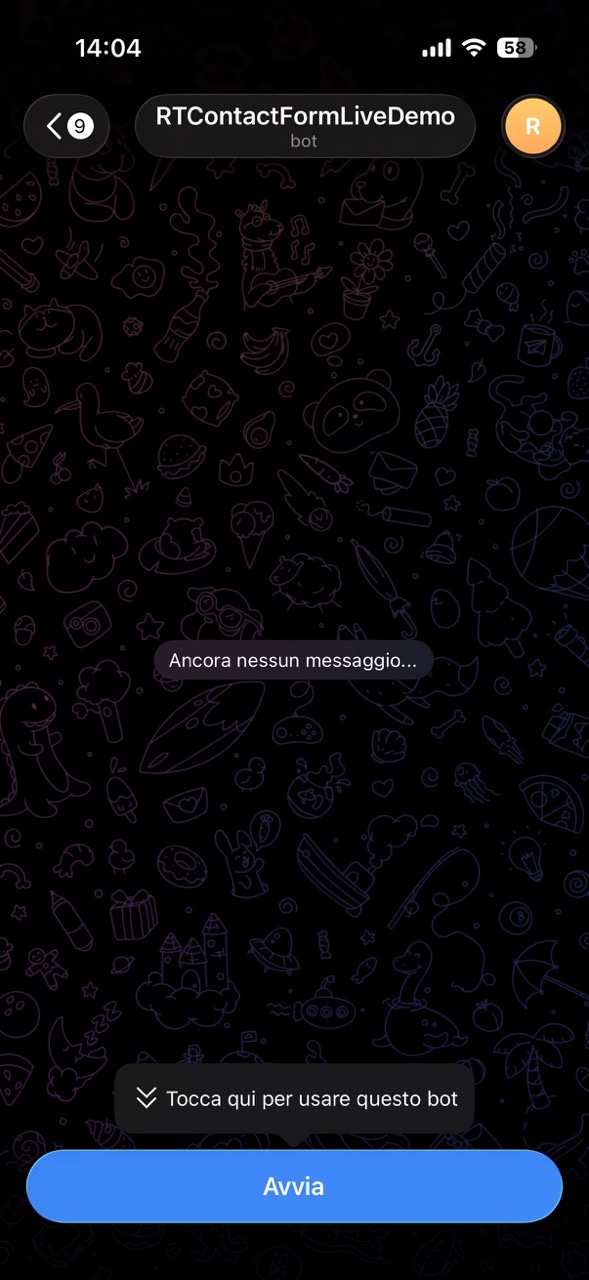
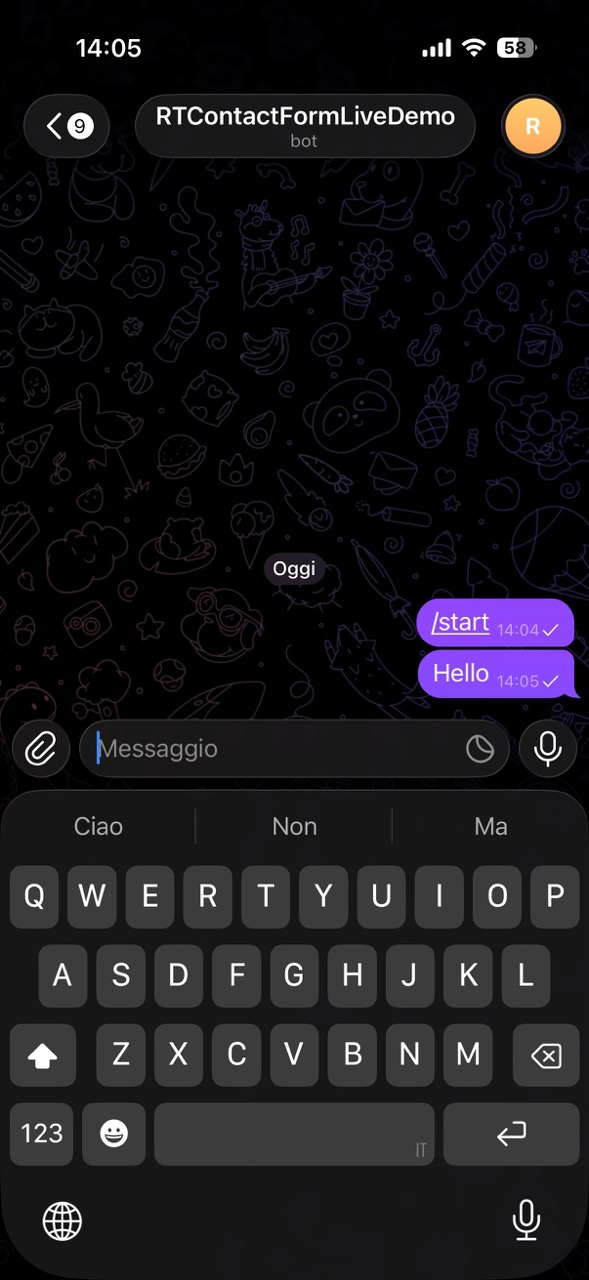
Open the chat with your bot, and click Start (or send /start).
-
Send a message: Write any message to your bot (e.g., "Hello!") and send it. This step is essential for the interaction to be recorded.
-
Open your browser: Open Chrome, Safari, or Firefox and go to this address, replacing
with the token you just copied: https://api.telegram.org/bot /getUpdates (Make sure to keep the word "bot" before the token. Practical example: https://api.telegram.org/bot1234567890:ABCdefGHI.../getUpdates)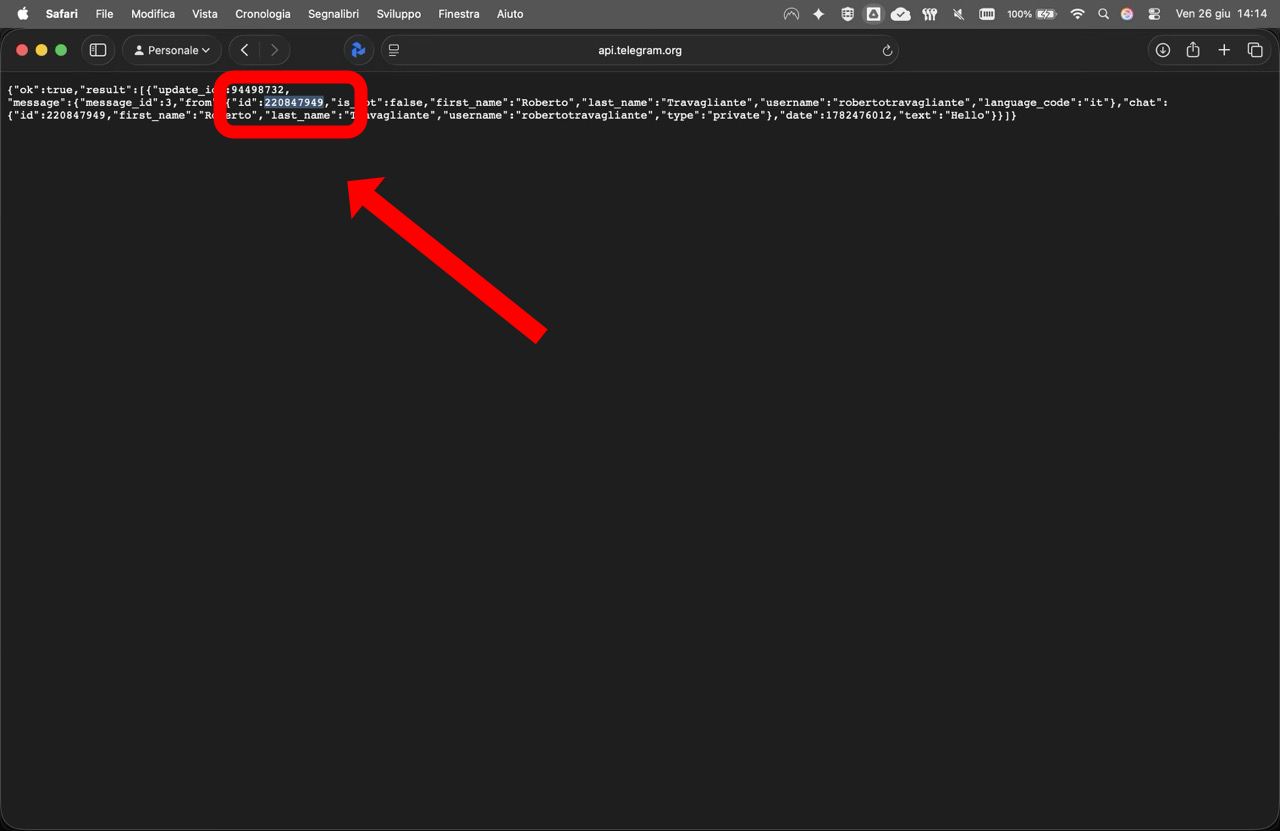
- Find the ID: You'll see a text page in JSON format. Look for the "chat" section. Inside, you'll find an "id" field. It should look something like this: "chat": { "id": 987654321, "first_name": "Mario", "type": "private" }
- That number (987654321 in the example) is your Chat ID.
Missing Chat ID?
If you see a JSON result similar to {"ok":true,"result":[]}, then your request was successful (the token is working, which is why "ok":true" is there), but Telegram has no recent or unread messages queued for your bot (the result field is empty). This usually happens for three reasons: the message was sent too long ago, it has already been "read" by another service, or you're trying to get the ID of a group where the bot doesn't have permission to read messages. Here's how to resolve the situation.
Solution 1: Timing (For private chats)
Often, simply synchronizing the message sending with the page refresh is enough.
- Keep the browser page open with the address https://api.telegram.org/bot
/getUpdates. - Go to Telegram, open the chat with your bot, and write a new message (e.g., "Test 2").
- Within a few seconds, return to the browser and reload the page.
- The result field should now be populated with the JSON containing your "id."
Solution 2: Permissions (For groups)
If you're trying to get a Group ID: By default, Telegram bots can't read regular messages in groups for privacy reasons. If you've added your bot to a group and the JSON is empty, do the following:
- Go to the Telegram group.
- Write a message tagging the bot. For example: @MyNotifications_bot Hi, are you there? (replace with your bot's username).
- Go to your browser and reload the getUpdates page.
- Alternative method for groups: Promote the bot to Group Admin. This will allow it to see all messages; write any message, reload the web page, and you'll find the Chat ID (which will begin with a minus sign, e.g., -100...).
Basic Settings Configuration
The Inspector provides several fundamental properties to bridge your form to Telegram:
Connection mode: Select dropdown Choose between "Client side (Direct)" or "Server side (Secure)".
Bot token & Chat ID: Text field Your Telegram credentials. The interface dynamically reveals the correct fields based on your selected connection mode.
Message title: Text field Defines the bold header of the message that arrives in Telegram (default: "New message from website").
Message Settings & Visual Previews
The form utilizes Javascript to dynamically render success, error, or processing states to the user without reloading the page.
Because these divs are hidden by default, the Inspector includes convenient toggle switches to force them to appear in the RapidWeaver Edit Mode. This allows you to easily style the typography and colors of each alert:
Sending message: Switch toggle Shows the preview for "Sending message...".
Success message: Switch toggle Shows the preview for "Thank you! Your message has been sent.".
Error message: Switch toggle Shows the preview for generic network failures.
Dropzones & Button Styling
The RT Contact Form Telegram is inherently modular. The primary container acts as a canvas where you insert your input fields.
Additionally, the Submit button itself features an optional Dropzone to embed icons or extra visual elements:
Send button text: Text field The textual label of your submit button.
Dropzone: Segmented Choose "Left", "Right", or "None" to position a custom icon dropzone relative to the button text.
Global Controls: Group Utilize standard Elements controls to refine Button Font Styles, Borders, Spacing, Sizing, and Backgrounds.
Honeypot Protection
To drastically reduce automated SPAM without frustrating real users with complex Captchas, the component employs a hidden Honeypot field named `website_url_honeypot`.
This field is positioned off-screen (`left: -9999px`) making it invisible to humans. However, automated spam bots read the raw HTML and will attempt to fill it out. If the script (or the PHP relay) detects that the honeypot contains any data, it silently aborts the transmission while pretending the message was successful, neutralizing the bot instantly.
Links, Commands & Bad Words Filtering
Telegram is a powerful platform, but it can be abused. The component includes three strict validation gates to protect your chat inbox, enforced via JavaScript (Client-side) and double-checked via PHP (Server-side).
Block links: Switch toggle When enabled, the script blocks any submission containing `http://`, `https://`, or `www.` using a strict Regex protocol. This is your primary defense against SEO spam.
Block commands: Switch toggle Prevents users from sending Telegram bot commands (e.g., `/start` or `/help`). This avoids potential exploits within the Telegram API syntax.
Block bad words: Switch toggle Activates the profanity and keyword filter.
Bad words list: TextArea A multiline input where you define forbidden words (one per line). The engine parses this array and strictly blocks the form if any of these words are detected, regardless of case sensitivity.
Bad Words Dictionary
To maintain a professional environment and protect your inbox from abuse, the component features a strict dictionary-based profanity and spam filter. When the Block bad words toggle is enabled, the form actively scans user inputs against a list of forbidden terms.
The validation operates dynamically on the client-side using JavaScript and, for maximum security, is verified again on the server-side via PHP.
How it works: The engine utilizes a Regular Expression word boundary (`\b`) to ensure that only exact, whole-word matches are blocked, which prevents false positives (e.g., blocking "classic" just because "ass" is banned). Additionally, the script automatically parses your list, splits it by line breaks, and evaluates everything case-insensitively.
Bad words list: TextArea To configure the filter, paste your list of forbidden words into this multiline input inside the Inspector. Important: You must insert exactly one word per line.
Downloadable Dictionaries
Building a comprehensive list of profanity and spam triggers from scratch can be tedious. To save you time, we have compiled ready-to-use text files containing the most common bad words for several languages.
Simply download the `.txt` file for your target language, open it, copy the entire content, and paste it directly into the Bad words list textarea in the RapidWeaver Elements Inspector.
RT Contact Form Telegram - Disclaimer and Terms of Use
Please read this Legal Disclaimer and Terms of Use carefully before installing, purchasing, or operating the RT Contact Form Telegram component for RapidWeaver Elements.
This document constitutes a binding legal agreement between you (the website administrator/end-user) and the developer. It outlines the scope of software licensing, strict limitations of liability, server security frameworks, and regulatory compliance duties. By deploying, embedding, or utilizing this Component on any web property, you signify your unconditional assent to all provisions detailed below.
1. General Information and "As-Is" License
The RT Contact Form Telegram component (hereinafter referred to as "the Component") for RapidWeaver Elements is provided on an "as is" and "as available" basis, without warranties of any kind, either express or implied. To the fullest extent permissible pursuant to applicable law, the developer disclaims all warranties, express or implied, including, but not limited to, implied warranties of merchantability, fitness for a particular purpose, non-infringement, and title. The entire risk as to the quality, performance, and implementation of the Component is borne solely by the end-user.
2. Comprehensive Limitation of Liability
Under no circumstances, including negligence, shall the developer, creators, or distributors of the Component be liable for any direct, indirect, incidental, special, punitive, or consequential damages that result from the use of, or the inability to use, the Component. This comprehensive limitation applies even if the developer has been advised of the possibility of such damages.
This includes, but is not limited to:
- Financial Loss: Loss of revenue, profits, business opportunities, or anticipated savings.
- Data Disruption: Corruption, loss, or unauthorized modification of website data, customer databases, or digital assets.
- Service Interruptions: Total or partial downtime of the host website, e-commerce storefront, or server infrastructure.
- Procurement Costs: The cost of procurement of substitute goods or services resulting from any defect in the Component.
3. File Security, Server Configuration, and Fraud Prevention
The secure storage, management, and distribution of all digital products made available for download via the Component are the exclusive responsibility of the website administrator. The developer does not guarantee, warrant, or represent that:
- The Component is completely immune to cyber-attacks, security vulnerabilities, or malicious exploits.
- The Component can prevent sophisticated unauthorized access, link-sharing, hotlinking, or fraudulent downloads of your digital assets. The user acknowledges that server-side security configurations, directory protection (such as .htaccess rules), and file permissions are independent of the Component and must be managed adequately by the user or their hosting provider.
4. Third-Party Services and Payment Gateways Disclaimer
If the Component interacts, integrates, or bridges with third-party platforms—including but not limited to payment gateways (e.g., Stripe, PayPal), cloud storage providers (e.g., Amazon S3, Dropbox), or email marketing services—the developer disclaims all liability for the functionality, API changes, or security breaches of those external services.
- Payment Processing: The Component does not directly process, store, or handle sensitive financial data or credit card numbers. All transaction handling is offloaded to the respective third-party payment gateways.
- API Failures: The developer is not responsible for transaction failures, double-charging, or failed download triggers caused by third-party API downtime or deprecation.
5. Compatibility, Software Updates, and Maintenance
While the Component has been developed and tested to be compatible with RapidWeaver Elements, the developer makes no guarantees regarding:
- Future Compatibility: Continued operation following future software updates, core changes, or architecture overhauls of the RapidWeaver Elements platform.
- Interoperability: Seamless operation alongside third-party plugins, themes, stacks, extensions, or custom scripts, which may alter the website's environment or DOM structure. The developer reserves the right, but is not obligated, to issue updates, patches, or bug fixes for the Component at their sole discretion.
6. Legal, Fiscal, and Regulatory Compliance
The website administrator assumes full and sole responsibility for ensuring that their use of the Component complies with all local, national, and international laws, regulations, and directives governing e-commerce, digital commerce, and data privacy. This includes, but is not limited to:
- Data Privacy: Full compliance with the General Data Protection Regulation (GDPR), CCPA, and any other relevant privacy frameworks concerning the collection of customer data during the checkout/download process.
- Taxation: The accurate calculation, collection, reporting, and remittance of digital taxes (such as EU VAT, digital sales tax, or local consumption taxes) applicable to cross-border digital downloads.
- Intellectual Property: Ensuring that the digital goods offered for download do not infringe upon the copyrights, trademarks, or proprietary rights of any third party.
7. Acceptance of Terms
By downloading, installing, purchasing, or utilizing RT Contact Form Telegram on any website, you explicitly acknowledge that you have read, understood, and agreed to be bound by all the terms, conditions, and limitations outlined in this disclaimer. If you do not agree to these terms, you must immediately cease using the Component and remove all copies of it from your project files.