Confirmation Email Templates
Elevating the Purchase Experience: Email Templates
First impressions matter, especially the moment immediately following a successful transaction. To ensure your customer's post-purchase experience aligns perfectly with your brand identity, the RT Digital Downloads suite now features a highly versatile Email Templating Engine. Instead of settling for plain, uninspired automated receipts, you now have complete control over the visual presentation of the emails that deliver your secure download links.
For rapid deployment, RT Digital Downloads comes pre-loaded with 10 professionally designed templates, that you can choose directly by using the RapidWeaver Elements Property Inspector. Ranging from a sleek "Modern" aesthetic and an elegant "Dark" mode to a vibrant "Neon" and a highly formal "Corporate" layout, these built-in options require absolutely zero coding knowledge. Simply select your preferred visual style from the dropdown menu, and the backend engine will automatically format the typography, structural layout, and spacing to deliver a polished, mobile-responsive email straight to your buyer's inbox.
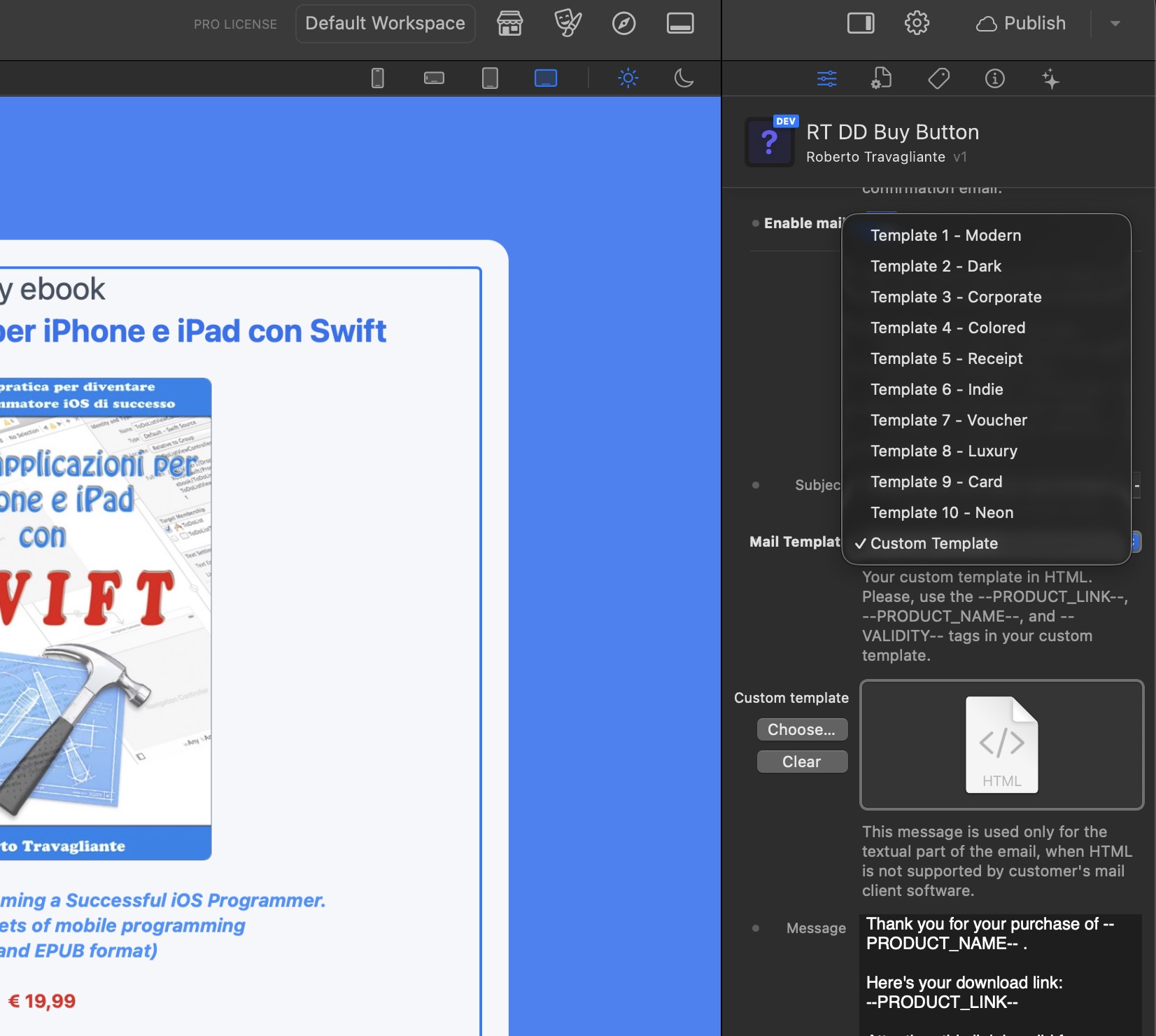
For advanced users, developers, and agencies requiring absolute brand pixel-perfection, the system also supports a Custom HTML Template mode. By selecting the "Custom Template" option, a dedicated resource field is unlocked in the Inspector, allowing you to upload your own handcrafted HTML file. This grants you total structural freedom to embed your own CSS styles, inject custom header graphics, add promotional footers, and design a truly bespoke delivery experience that matches your corporate identity perfectly.
Whether you rely on one of the ten predefined layouts or craft your own custom HTML, the framework relies on a smart injection system to personalize each dispatch. You simply need to place three dynamic tags—--PRODUCT_NAME--, --PRODUCT_LINK--, and --VALIDITY--—within your custom HTML code. Upon payment confirmation, the backend PHP engine dynamically hunts down these specific tags and replaces them with the live transaction data. This guarantees that every single customer receives their unique, cryptographically secure download token flawlessly. Furthermore, the system pairs these rich HTML designs with your configured plain-text fallback message, ensuring that your vital download links still reach customers who may be using legacy or strictly text-based email clients.
Email Templates Gallery
Click on any of the pre-designed templates below to view a high-resolution preview.
Email Templates Generator
While coding a custom HTML email from scratch offers ultimate freedom, it can often be a frustrating and time-consuming process.
Modern email clients (like Gmail, Outlook, and Apple Mail) have incredibly strict and varied rendering rules, frequently requiring archaic table-based layouts and inline CSS just to display correctly.
To eliminate this technical friction and streamline your workflow, we have developed a dedicated Custom Template Generator to act as the perfect companion tool to the RT Digital Downloads suite.
Custom Email Template Generator
This standalone generator provides a highly intuitive, visual interface where you can build your bespoke email layout without needing to write or debug a single line of code. You can effortlessly adjust structural elements, define your brand's specific color palette, insert your corporate logo, and craft your personalized messaging. Most importantly, the tool automatically handles the complex placement of our required dynamic system tags—such as --PRODUCT_NAME--, --PRODUCT_PRICE--, --PRODUCT_CURRENCY--, --PRODUCT_LINK--, and --VALIDITY-- ensuring that your cryptographic download tokens will always generate flawlessly for the end-user.
Once your design is perfected, the generator instantly process your work and exports a clean, highly compatible, production-ready HTML file. To implement your new design, simply select the "Custom Template" option within your RapidWeaver Elements Inspector and upload this freshly generated file into the designated resource field.
By leveraging this tool, you can guarantee a highly personalized, pixel-perfect post-purchase experience that seamlessly matches your unique brand identity, all while maintaining maximum security and cross-platform compatibility.